

What is a ‘Right To Work’?

Before you can begin your exciting journey into TV and Film as an artiste with Uni-versal Extras, we need to know you have the ‘Right to Work‘ (AKA ‘RTW‘).
Think of it as your golden ticket to the action 😉
Today we’re breaking down the basics of right to work, so you know exactly what you need to upload before the show can begin.
Let’s jump right in…
What Actually Is Right To Work?
When we say ‘Right to Work’, we have to check that you are legally allowed to work in the UK as a self-employed artiste. You will prove this by uploading certain documents when you register.
We will never request this information via email. Documents must be uploaded by you and stored on your profile.
Who needs a Right to Work?
If you don’t have the right to work in the UK, you’re not allowed to work with us… it’s that simple!
Anyone looking to work as a Supporting Artist with Uni-versal Extras must have the right to work as a self-employed artiste in the UK.
What Should I Upload?
The documents we need to prove your right to work will vary depending on your citizenship status.
You can choose between:
– UK Citizen (for citizens of England, Scotland, Wales and Northern Ireland)
– EU/EEA Citizen + Swiss (for citizens of countries within the EU/EEA and Switzerland)
– Non-EU Citizen (for citizens of countries outside the EU/EEA, not including Switzerland)
Once you have selected this option via the ‘My Documents’ page, you will be given advice on what to upload.
Example images and guidance is also provided for each document to help you.
Have I Provided What Is Needed?
If you don’t have sufficient documents uploaded, you will be prompted to provide them.
To check your RTW Status, visit the ‘Profile’ tab of the UVE Artiste app and select ‘My Documents’ –
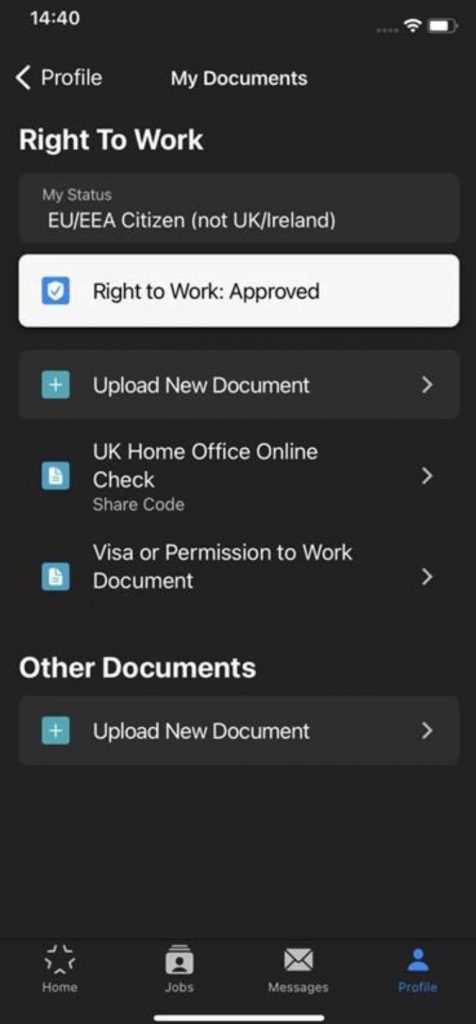
If you see the words, “Your selection has now been locked by our administrator”, that is great news! It means that we have manually verified your documents and your ‘Right to Work’ is approved.
Contact Us if your status changes, or simply upload new proof via your profile.
How Do I Upload my RTW?
Documents can be uploaded using the ‘Upload New’ section in ’My Documents’.
When you select a document, you will see various fields to enter, help text and an example image. Please follow the guidelines carefully and remember that our moderation team manually check all documents.
Common reasons why a document may not be accepted include:
- The field information entered does not match the photo
- The image is blurry or not clear
- The image is cropped or does not show the whole document
- The name, date of birth or any other information is inconsistent with the information that you have provided on your Profile itself
Document Expiry Notifications
If a document expires (which not all documents do) you will be notified twice:
– 30 days before it is due to expire, and
– On the date that the document expires
These emails are automated and sent when the document expires. If you have already provided an updated version, you can disregard the email.
Please also note. For ‘UK Citizens’, the expiry of right to work documents will not result in you losing the right to work.
UK Citizens
As a UK citizen you have the choice of three document combinations to prove your right to work.
A UK passport is the easiest option because you just need to upload one single document.
We may accept out-of-date UK passports, but it is always best to have the most current version uploaded to your profile if possible.
If you are a ‘UK Citizen’ but do not have a UK passport, please upload a ‘Full UK Birth or Adoption Certificate’ and a ‘National Insurance Number Proof’ document.
Alternatively, you can provide a ‘Registration or Naturalisation Certificate’ and a ‘National Insurance Number Proof’ document. NI proof must be in the form of an official document, issued by a government agency or a previous employer, such as a P45.
EU/EEA Citizens + Swiss & Non-EU Citizens
The simplest way for you as an EU Citizen to prove your right to work is by obtaining a share code via the gov.uk website here.
Once provided we will validate the code for you, so you don’t need to upload anything other than your share code.
| ⚠️ | NO LONGER ACCEPTED |
|---|---|
| Biometric Residency Permit (BRP) We have not been allowed to accept BRP cards as proof of Right to Work since April 2022, you will need to do a UK Home Office Online Check instead. ILR or ILE stamps in Expired Passports All visa stamps must be in current passports. |
Not quite done? Why not read up on even more of our recent content on the UVE blog now?